


Help Center Answer Questions
How do I enter a custom angle in the design?
2026-11-04 12:27:50
663
After selecting a picture, the position information and angle information of that picture pops up in the upper left corner.
In the input box of angle, fill in the value of angle change.
Select the target real-time rotation angle.
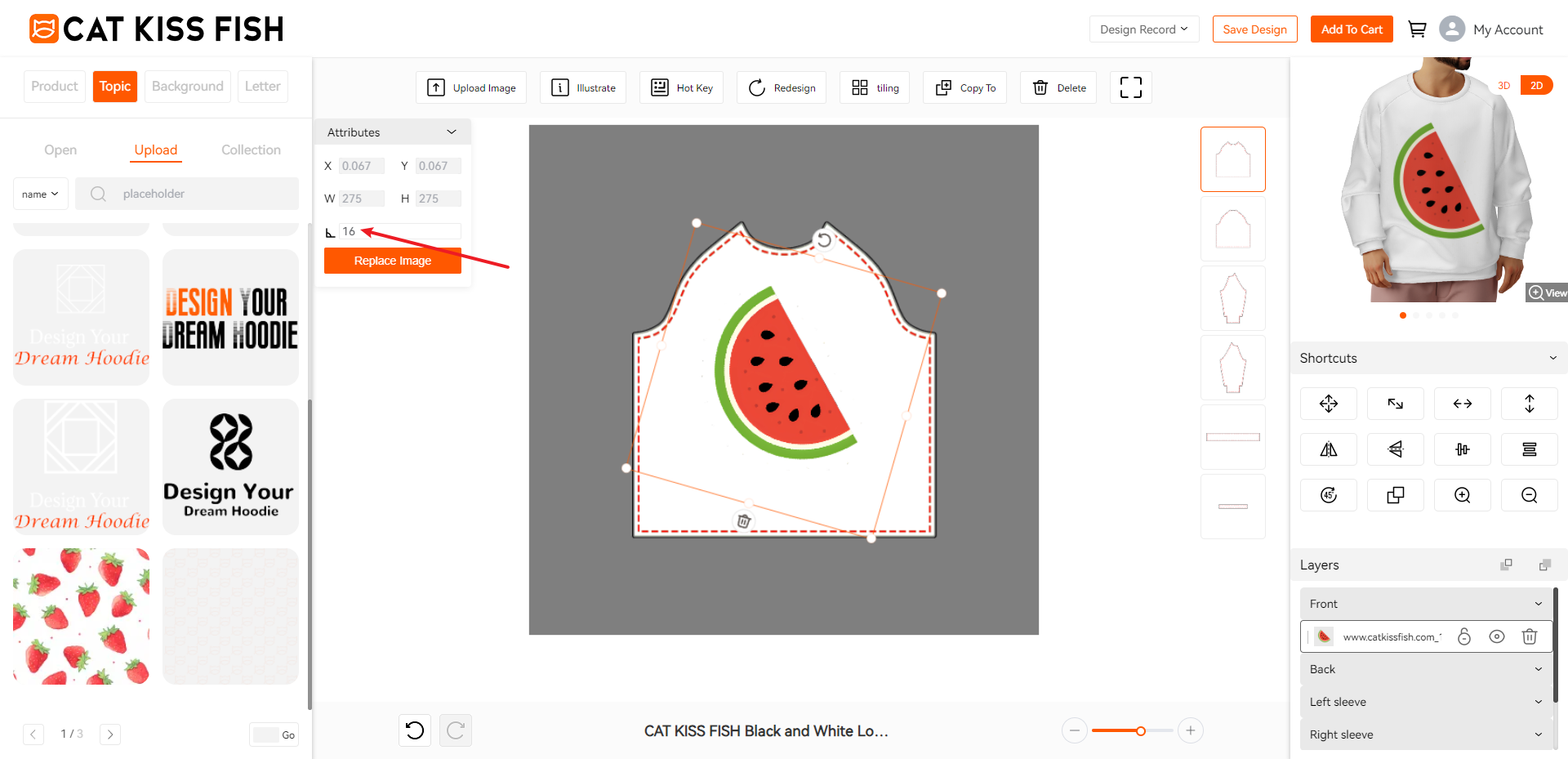
Note: The width, height and xy-axis position information are not editable. For display only.
Still need help?
Click on the bottom right corner to contact us now and fill in your e-mail address to subscribe to us now!
Experience print-on-demand with Cat Kiss Fish in just six steps!
Create an account
Sign up and enjoy the free designer and tons of clips immediately!
Design Products
There are various design modes in the design, custom material, color editor, free gallery, material categorization.
Affiliated stores release products
Simply connect with your store and we can co-supply a steady stream of stock to sell your designs to consumers!
Order synchronization
After placing an order with CatKissFish, you can be updated on the status of your order in real time to keep track of the delivery progress.
Factory production
We have a large supply chain to provide you with goods security in production orders, commitment to the fastest production for you!
Logistics worldwide one piece shipment
We have more logistics providers to cooperate with, so that your goods will be delivered to you in the shortest possible time!
Find out more
Discover CATKISSFISH's complementary services and unique culture!
You may also like
All-over Print Product
All-Over Print Women's Oversized Sleepshirt Batwing Nightshirt
M
$7.61
96% Polyester & 4% Spandex
Production time(90%):2-3 days
Team Design
Color:
All-over Print Product
All-Over Print Women's Casual Pants-Brushed Milk Silk 200 GSM
S-XXXL
$4.41
96% Polyester & 4% Spandex
Production time(90%):2-3 days
Team Design
Color:
All-over Print Product
All-Over Print Teens UPF50+ Bodysuit Zipper Rash Guard
2T-20
$9.35
92% Polyester & 8% Spandex
Production time(90%):2-3 days
Team Design
Color:
All-over Print Product
All-Over Print Women's Draped Open Front Cardigan
S-6XL
$8.55
94% Polyester & 6% Spandex
Production time(90%):2-3 days
Team Design
Color:
2D Print Product
4 Sides Design Simple Print Unisex Kids Thin T-Shirt Short Sleeve
2T-XL
$5.32
100% Cotton
Production time(90%):2 days
Recommend
Team Design
Color:
All-over Print Product
All-Over Print Women's Straight A Dress Sleeveless
S-6XL
$7.21
96%Poly4%Span
Production time(90%):2-3 days
Team Design
Color:
2D Print Product
DTG 2 Sides Print Unisex White Cotton Tank Top
S-5XL
$5.57
100% Cotton
Production time(90%):2-3 days
Team Design
Color:
All-over Print Product
All-Over Print Men's Polo Shirt Casual Fit-Pearl Mesh Fabric 190 GSM
S-6XL
$7.48
100% Polyester
Production time(90%):2-3 days
Team Design
Color:
All-over Print Product
Drawstring Mesh Backpack Bag for Sport Gym 42x35cm
M
$3.20
100% Polyester
Production time(90%):2-3 days
Team Design
Color:
All-over Print Product
All-Over Print Men's Faux Sweater Cardigan with Pockets
S-6XL
$10.28
100% Polyester
Production time(90%):2-3 days
Team Design
Color:
All-over Print Product
All-Over Print UPF50+ Men's Outdoor Lightweight Splash Shorts with 3 Pockets
XS-6XL
$16.82
87% Polyester & 13% Spandex
Production time(90%):2-3 days
Team Design
Color:
All-over Print Product
All-Over Print Women's Overalls Jumpsuits Sleeveless Pant-Imitation Cotton 170 GSM
S-6XL
$9.21
96% Polyester & 4% Spandex
Production time(90%):2-3 days
Team Design
Color:
All-over Print Product
All-Over Print Women's Velvet Hoodies with Cat Ears
S-5XL
$12.42
100%Poly
Production time(90%):2-3 days
Team Design
Color:
All-over Print Product
All-Over Print Unisex 2 Piece Short Sleeve Workout Sets
S-6XL
$11.35
87% Polyester & 13% Spandex
Production time(90%):2-3 days
Team Design
Color:

$240 OFF
For New
Work Orders
Help center