

Help Center Answer Questions
How to check order status?
2026-09-30 13:17:46
1616
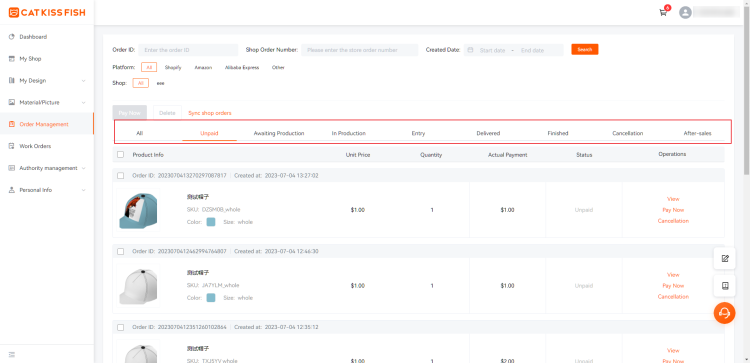
Select "Order Management" and click to enter the "Orders" page. You can click to switch between different statuses of the order to view the status of your order.
You can also view it in the "Status" column of the order list;
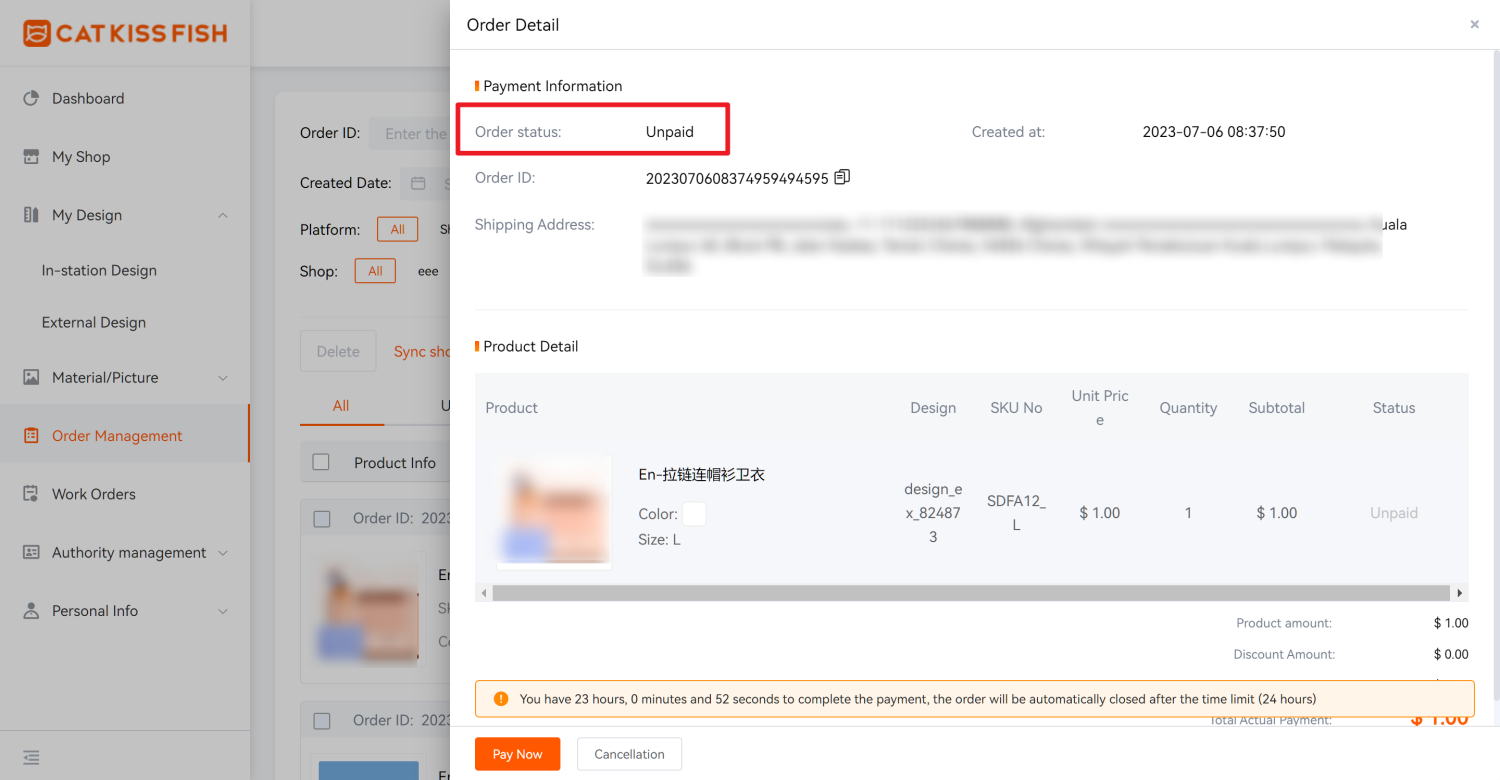
You can also view it in the upper left corner of the "Order Details" page.
You can also view it in the upper left corner of the "Order Details" page.
To be confirmed: After importing the order, you can click "Save" to upload the design information to the platform and wait for the approval, then you can click the payment. Operation can be cancelled/modified address, logistics.
Unpaid:Importing orders is designed to upload successfully after review. But if you have not yet paid for the order, the operation can be cancelled/modified address, logistics.
Awaiting Production:Factory pending production. Operational refunds are available.
In Production:The order is already in production.
Entry:The order has been completed in the warehouse.
Delivered:The order has been shipped. You can operate to check the logistics/confirm receipt of goods. (Default international logistics 45 days to automatically confirm receipt)
Finished:The order will be sent to the customer after it was completed.
Cancellation:Cancelled orders will be displayed here.
After-sales:Refunded orders will be displayed here. You can operate to view the progress.
Still need help?
Click on the bottom right corner to contact us now and fill in your e-mail address to subscribe to us now!
Experience print-on-demand with Cat Kiss Fish in just six steps!
Create an account
Sign up and enjoy the free designer and tons of clips immediately!
Design Products
There are various design modes in the design, custom material, color editor, free gallery, material categorization.
Affiliated stores release products
Simply connect with your store and we can co-supply a steady stream of stock to sell your designs to consumers!
Order synchronization
After placing an order with CatKissFish, you can be updated on the status of your order in real time to keep track of the delivery progress.
Factory production
We have a large supply chain to provide you with goods security in production orders, commitment to the fastest production for you!
Logistics worldwide one piece shipment
We have more logistics providers to cooperate with, so that your goods will be delivered to you in the shortest possible time!
Find out more
Discover CATKISSFISH's complementary services and unique culture!
You may also like

Customers can participate in the whole process of product design and manufacturing, to meet the personalized needs of the one-stop design platform.
Copyright © 2026 CatKissFish ICP No.2021011063-1

$240 OFF
For New
Work Orders
Help center