


Help Center Answer Questions
How do I check the status of my products?
2026-11-04 12:05:42
2985
Yes, first of all:
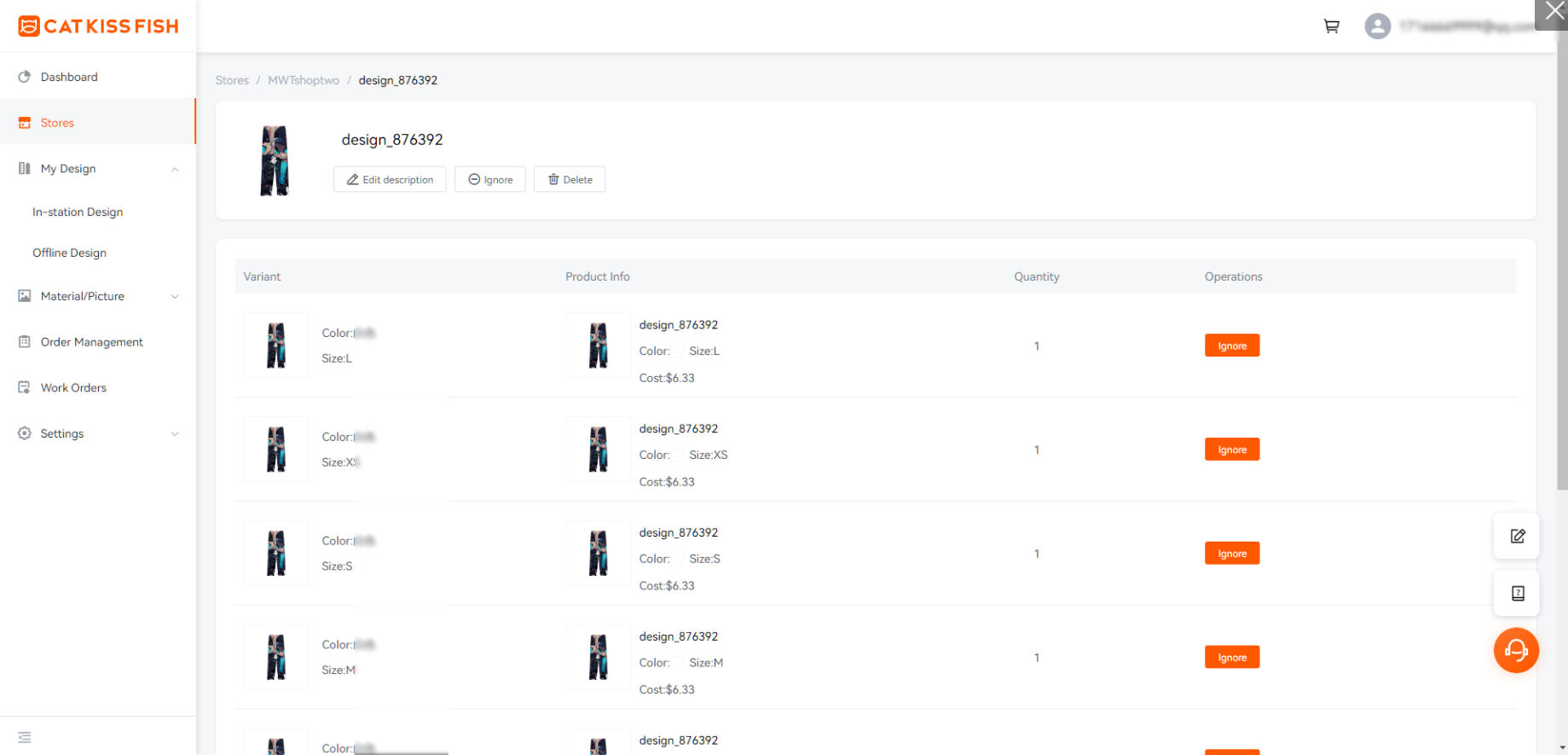
Stand-alone "Dashboard" into the merchant center.

Click on "Stores" to go to store details.


You can see the status of the product, click "Edit" on the right to enter the status of each variant in the list of variants of the product.
Still need help?
Click on the bottom right corner to contact us now and fill in your e-mail address to subscribe to us now!
Experience print-on-demand with Cat Kiss Fish in just six steps!
Create an account
Sign up and enjoy the free designer and tons of clips immediately!
Design Products
There are various design modes in the design, custom material, color editor, free gallery, material categorization.
Affiliated stores release products
Simply connect with your store and we can co-supply a steady stream of stock to sell your designs to consumers!
Order synchronization
After placing an order with CatKissFish, you can be updated on the status of your order in real time to keep track of the delivery progress.
Factory production
We have a large supply chain to provide you with goods security in production orders, commitment to the fastest production for you!
Logistics worldwide one piece shipment
We have more logistics providers to cooperate with, so that your goods will be delivered to you in the shortest possible time!
Find out more
Discover CATKISSFISH's complementary services and unique culture!
You may also like
All-over Print Product
All-Over Print Unisex 2 Piece Short Sleeve Workout Sets
S-6XL
$11.17
87% Polyester & 13% Spandex
Production time(90%):2-3 days
Team Design
Color:
All-over Print Product
All-Over Print Men's Lapel Sweatshirt-Air Layer 200 GSM
S-6XL
$7.09
95% Polyester & 5% Spandex
Production time(90%):2-3 days
Team Design
Color:
All-over Print Product
All-Over Print UPF50+ Women's Lightweight Classic Raglan Jacket
S-6XL
$31.81
87% Polyester & 13% Spandex
Production time(90%):2-3 days
Team Design
Color:
All-over Print Product
Custom Women's Crossbody Round Bag
Unisize
$4.46
100%Poly
Production time(90%):2-3 days
Team Design
Color:
All-over Print Product
All-Over Print Men's Polo Shirt Long Sleeve Casual Fit-Five-Piece Design
S-5XL
$7.23
100% Polyester
Production time(90%):2-3 days
Team Design
Color:
All-over Print Product
All-Over Print Women's Full-Zip Hoodie Jacket-Air Layer 230 GSM
XS-6XL
$9.33
96% Polyester & 4% Spandex
Production time(90%):2-3 days
Team Design
Color:
All-over Print Product
All-Over Print Women's Workout Tank Top-Imitation Cotton 170 GSM
S-6XL
$3.68
96% Polyester & 4% Spandex
Production time(90%):2-3 days
Team Design
Color:
All-over Print Product
All-Over Print Women's Bikini Swimsuit with Cross Shoulder and Ruffle Sleeves
S-6XL
$6.96
95% Polyester & 5% Spandex
Production time(90%):2-3 days
Team Design
Color:
All-over Print Product
All-Over Print Women's V-Neck Causal Sweatshirt
S-6XL
$7.09
100% Polyester
Production time(90%):2-3 days
Team Design
Color:
All-over Print Product
All-Over Print Women's Half Zipper Sweatshirt
XS-6XL
$8.28
100% Polyester
Production time(90%):2-3 days
Team Design
Color:
All-over Print Product
Custom Double-Sided Print 4 Sizes Feather Flag with Pole
S-XL
$16.57
100% Polyester
Production time(90%):5 days
Color:
All-over Print Product
All-Over Print Men's Badminton Jersey Mesh Shirt Special Neck
XXS-7XL
$5.78
100% Polyester
Production time(90%):2-3 days
Team Design
Color:
All-over Print Product
All-Over Print Women's One Piece Swimsuit with Padded
S-6XL
$10.64
84%Poly16%Span
Production time(90%):2-3 days
Team Design
Color:
All-over Print Product
All-Over Print Men's Soccer Jersey U-Neck T-Shirt-Mi Tong Mesh 140GSM
XS-XXXL
$4.46
100% Polyester
Production time(90%):2-3 days
Team Design
Color:

$240 OFF
For New
Work Orders
Help center