


Help Center Answer Questions
How do I edit product variations in my store?
2026-11-04 12:01:36
1515
Follow these steps:
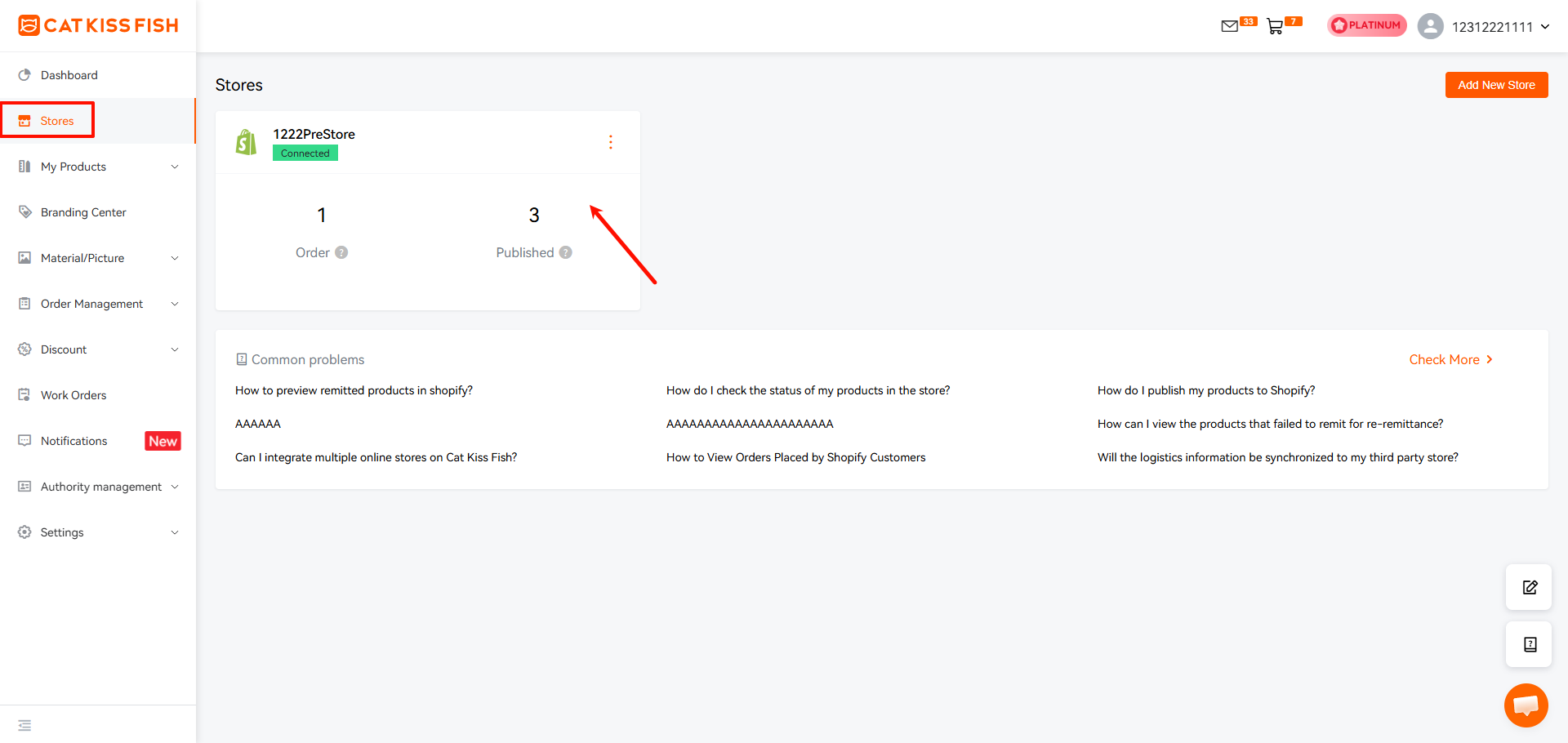
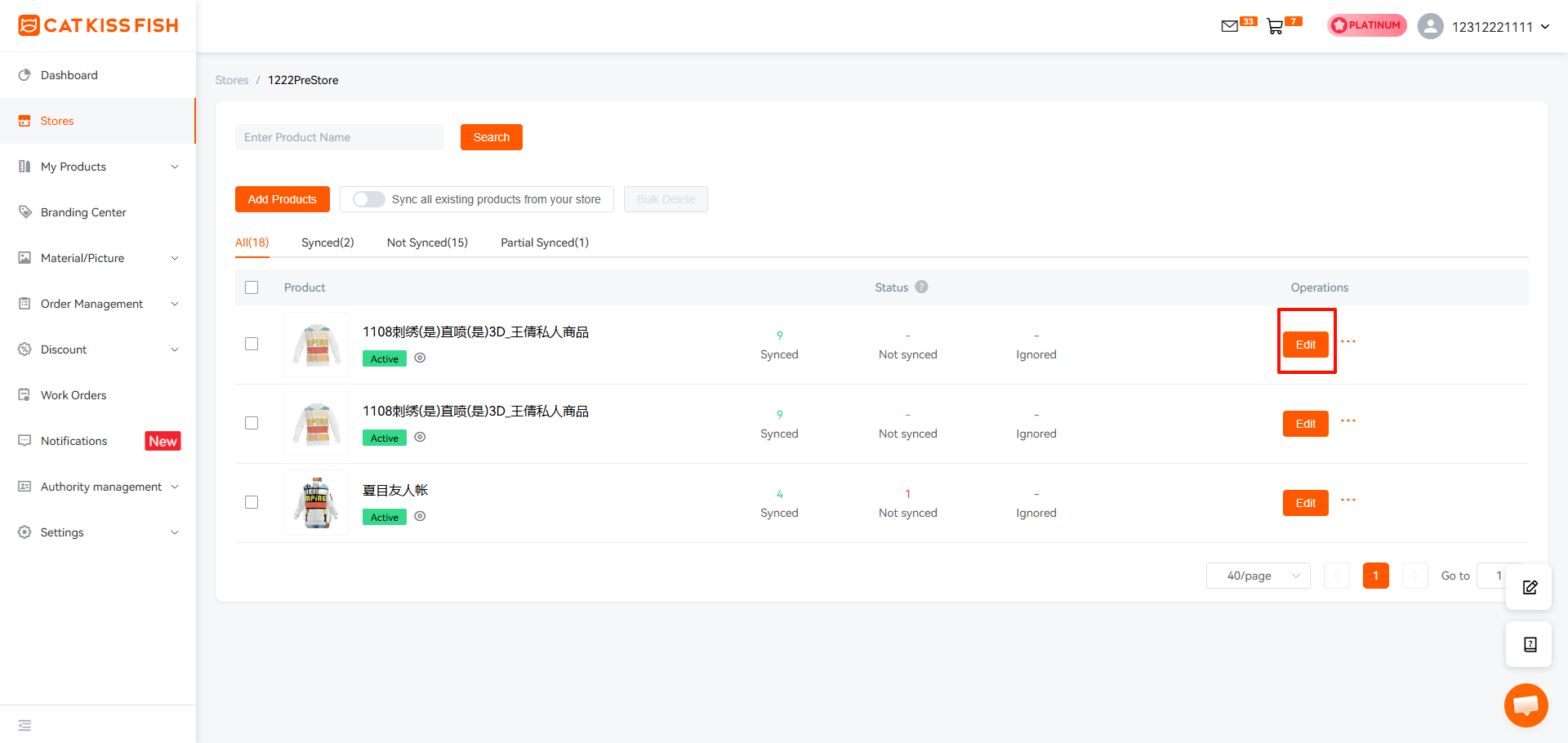
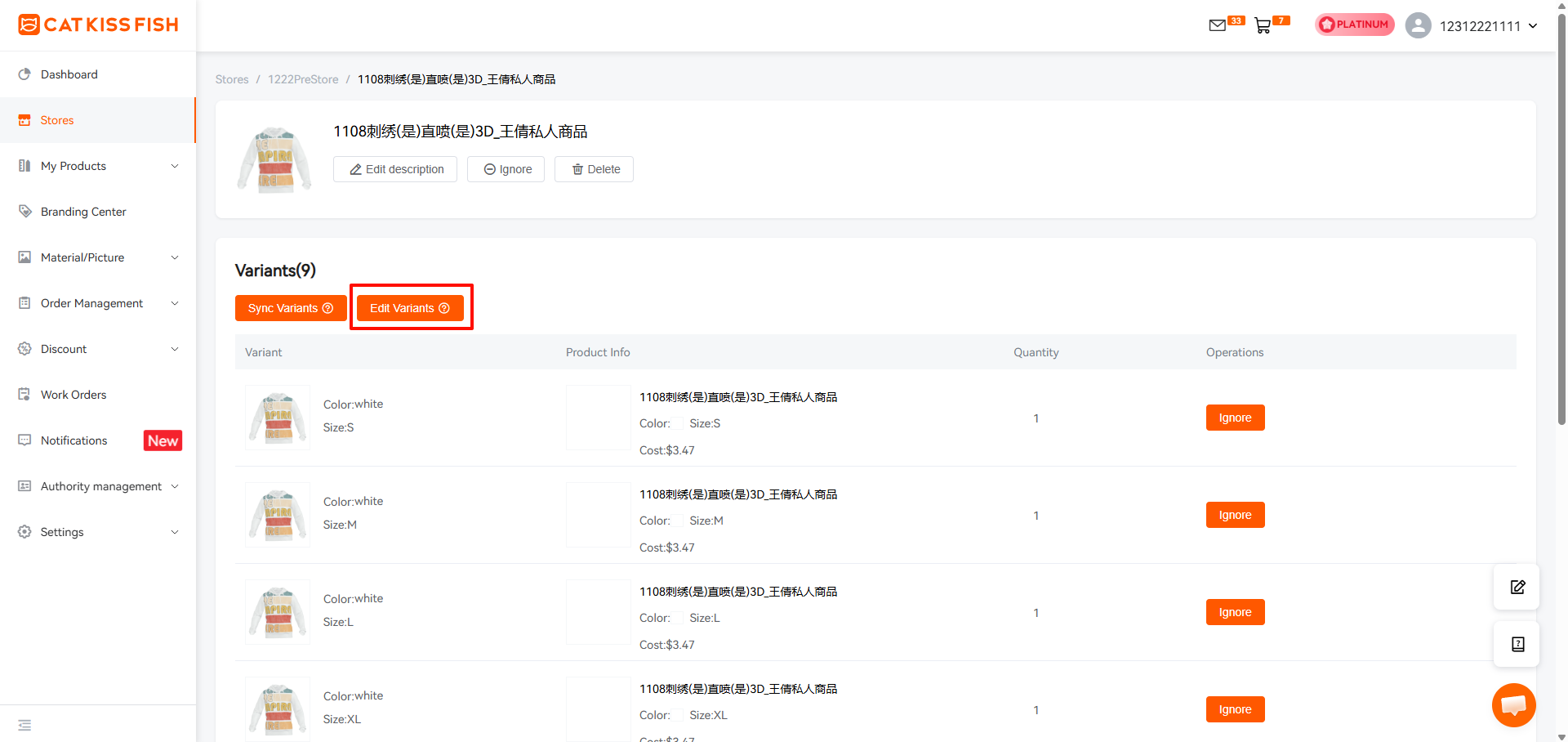
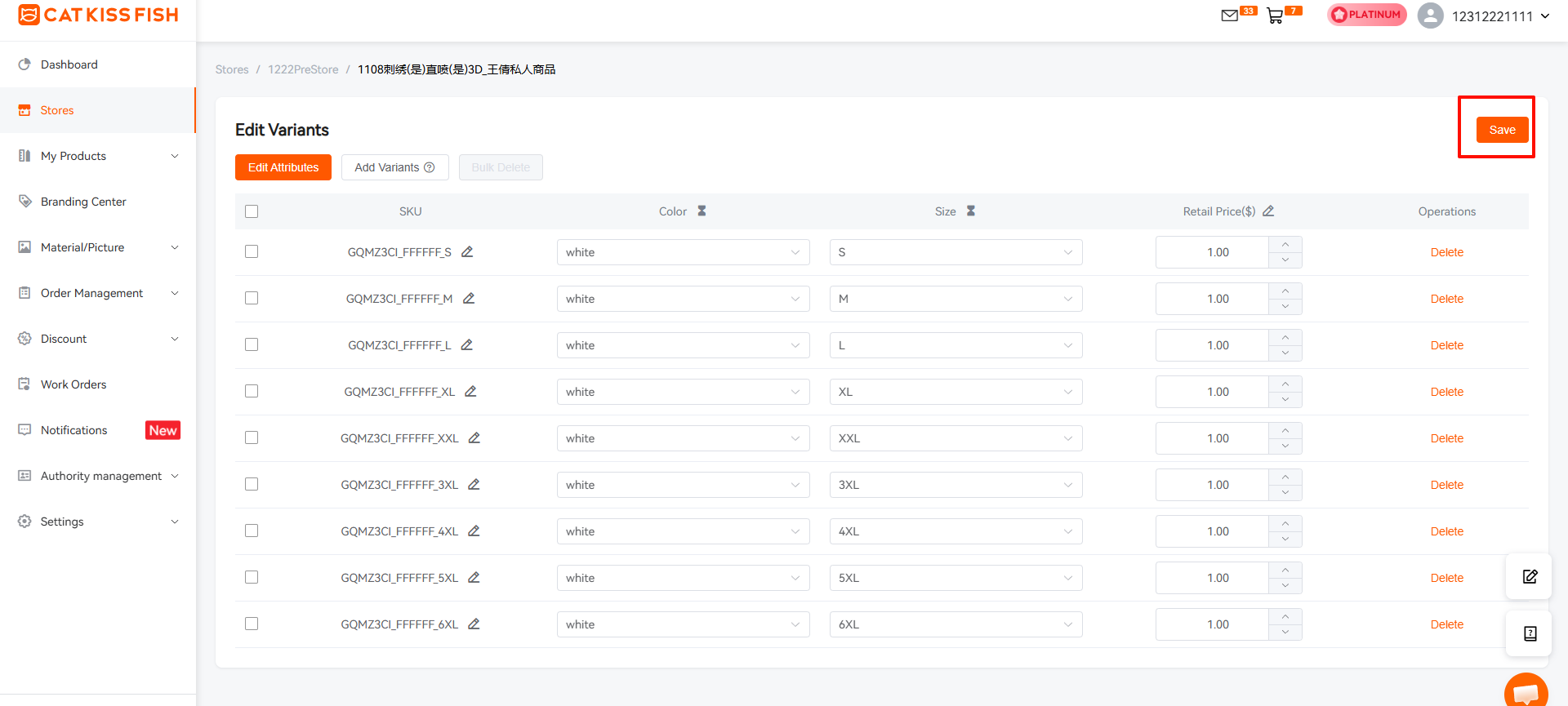
On this page, you can edit the product SKU, color, size, and price. The following operations add/delete product colors and sizes: Separate additions and deletions with commas.
Note: SKUs, colors, and sizes cannot be the same, and prices cannot be empty. To edit this page, click the "Save" button in the upper right corner.
Still need help?
Click on the bottom right corner to contact us now and fill in your e-mail address to subscribe to us now!
Experience print-on-demand with Cat Kiss Fish in just six steps!
Create an account
Sign up and enjoy the free designer and tons of clips immediately!
Design Products
There are various design modes in the design, custom material, color editor, free gallery, material categorization.
Affiliated stores release products
Simply connect with your store and we can co-supply a steady stream of stock to sell your designs to consumers!
Order synchronization
After placing an order with CatKissFish, you can be updated on the status of your order in real time to keep track of the delivery progress.
Factory production
We have a large supply chain to provide you with goods security in production orders, commitment to the fastest production for you!
Logistics worldwide one piece shipment
We have more logistics providers to cooperate with, so that your goods will be delivered to you in the shortest possible time!
Find out more
Discover CATKISSFISH's complementary services and unique culture!
You may also like
All-over Print Product
All-Over Print UPF50+ Men's Raglan Hooded Jacket with String Coat Pockets
S-6XL
$36.99
87% Polyester & 13% Spandex
Production time(90%):2-3 days
Team Design
Color:
2D Print Product
Front Design Simple Print Men's Zip Up Jacket
S-XXXL
$11.29
95% Polyester & 5% Spandex
Production time(90%):6 days
Team Design
Color:
2D Print Product
1 Side Design Print Women's Legging Yoga Pants
S-XXL
$7.93
82.5% Polyester & 17.5% Spandex
Production time(90%):6 days
Team Design
Color:
All-over Print Product
All-Over Print UPF50+ Women's Cross Collar Tank Top
S-6XL
$6.94
92% Polyester & 8% Spandex
Production time(90%):2-3 days
Team Design
Color:
All-over Print Product
All-Over Print Girls Dress with Wavy Hem
4T-13-14
$5.34
93% Polyester & 7% Spandex
Production time(90%):2-3 days
Team Design
Color:
All-over Print Product
All-Over Print Women's Cami Bikini Swimsuit-Milk Silk 200 GSM
S-XXL
$6.01
95% Polyester & 5% Spandex
Production time(90%):2-3 days
Team Design
Color:
All-over Print Product
All-Over Print Kid's Polo Shirt Short Sleeve-White Thread Collar-Elastic Cloth 120 GSM
XXXS-XL
$5.88
96% Polyester & 4% Spandex
Production time(90%):2-3 days
Team Design
Color:
2D Print Product
Custom Metal Wall Art Panel Hanging-Black/Golden
8x10in-16x16in
$8.01
Titanium Alloy
Production time(90%):5 days
Color:
All-over Print Product
All-Over Print Men's Polo Shirt Golf Jersey
XS-6XL
$5.47
100% Polyester
Production time(90%):2-3 days
Team Design
Color:
All-over Print Product
All-Over Print Men's Thicken Cardigan
S-6XL
$18.16
100%Poly
Production time(90%):2-3 days
Team Design
Color:
All-over Print Product
All-Over Print Women's Formal Satin Long Dress-Yami Satin 210GSM
XXS-6XL
$24.70
97% Polyester & 3% Spandex
Production time(90%):2-3 days
Team Design
Color:
2D Print Product
Custom Leather Tote Bag Handbag with Top Handle Black&White
M-XL
$16.02
PU
Production time(90%):5 days
Color:
All-over Print Product
All-Over Print Women U Back One Piece Swimsuit
XS-6XL
$6.41
84%Poly16%Span
Production time(90%):2-3 days
Team Design
Color:
All-over Print Product
All-Over Men's Athletic Hoodie Short Sleeve
XXS-7XL
$5.74
100% Polyester
Production time(90%):2-3 days
Team Design
Color:

$240 OFF
For New
Work Orders
Help center