


Help Center Answer Questions
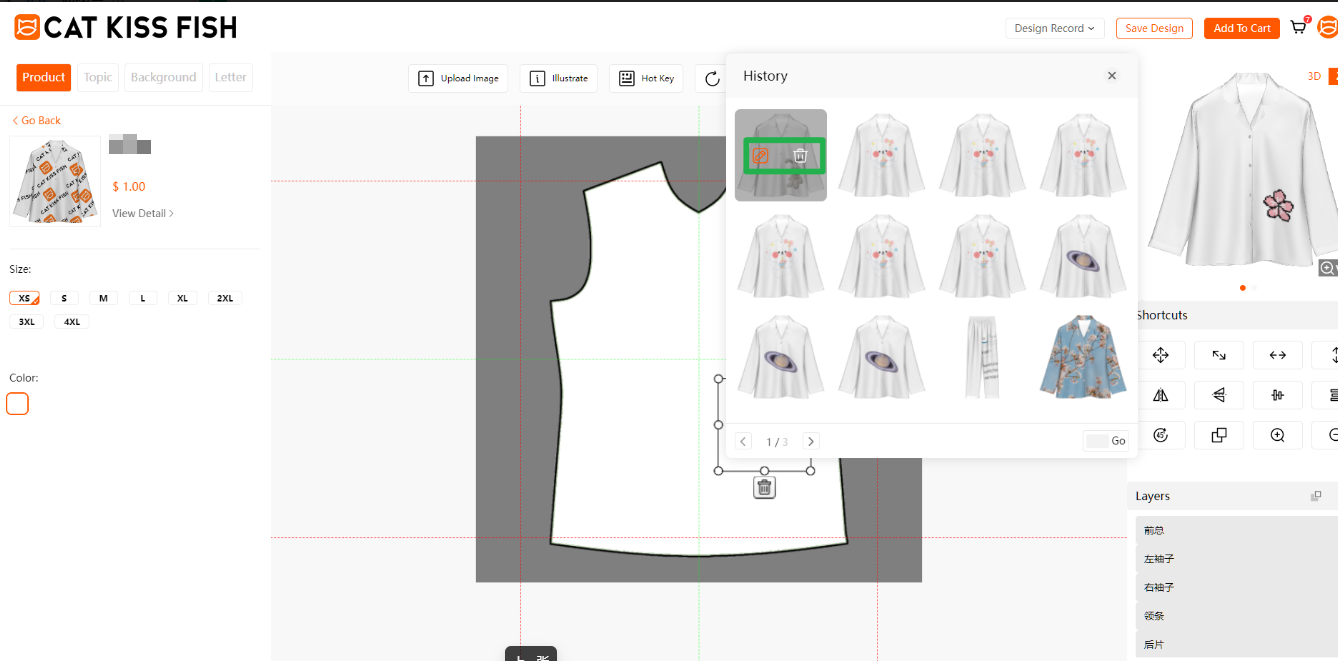
How can I view my saved design history?
2026-11-04 12:23:19
1402
Click on "Design Record" in the upper right corner.
Click "Load" icon and the designer loads historical designs by default
You can also click on the "Clear" icon and the design information will be deleted from the history.
Still need help?
Click on the bottom right corner to contact us now and fill in your e-mail address to subscribe to us now!
Experience print-on-demand with Cat Kiss Fish in just six steps!
Create an account
Sign up and enjoy the free designer and tons of clips immediately!
Design Products
There are various design modes in the design, custom material, color editor, free gallery, material categorization.
Affiliated stores release products
Simply connect with your store and we can co-supply a steady stream of stock to sell your designs to consumers!
Order synchronization
After placing an order with CatKissFish, you can be updated on the status of your order in real time to keep track of the delivery progress.
Factory production
We have a large supply chain to provide you with goods security in production orders, commitment to the fastest production for you!
Logistics worldwide one piece shipment
We have more logistics providers to cooperate with, so that your goods will be delivered to you in the shortest possible time!
Find out more
Discover CATKISSFISH's complementary services and unique culture!
You may also like
All-over Print Product
All-Over Print Men's Baseball Jacket-Air Layer 230 GSM
S-XXXL
$8.81
96% Polyester & 4% Spandex
Production time(90%):2-3 days
Team Design
Color:
All-over Print Product
All-Over Print Women's Sleeveless Crop Tank
XS-6XL
$4.94
88% Polyester & 12% Spandex
Production time(90%):2-3 days
Team Design
Color:
All-over Print Product
Custom 1PCS 14.5" Christmas Stocking for Holiday Christmas Decorations
Unisize
$2.94
100% Polyester
Production time(90%):2-3 days
Color:
All-over Print Product
All-Over Print Unisex Basketball Button Down Shirt Loose Fit
XXS-6XL
$7.21
95% Polyester & 5% Spandex
Production time(90%):2-3 days
Team Design
Color:
All-over Print Product
All-Over Print Women's Cami Bikini Swimsuit-Milk Silk 200 GSM
S-XXL
$6.01
95% Polyester & 5% Spandex
Production time(90%):2-3 days
Team Design
Color:
All-over Print Product
4 Piece Anti-Slip Car Floor Mats
M
$18.69
100% Polyester
Production time(90%):5 days
Color:
All-over Print Product
All-Over Print Men's UPF50+ Soccer Jersey Dry & Soft T-Shirt-Special POLO Neck Quick
S-6XL
$7.61
92% Polyester & 8% Spandex
Production time(90%):2-3 days
Bestselling
Acclaim
Seasonal
Team Design
Color:
All-over Print Product
56CM-60CM Peaked Cap(SYX33B)
56-60
$5.34
Coated fiber
Production time(90%):2-3 days
Color:
All-over Print Product
All-Over Print Men's Patch Design Soccer Jersey
XS-XXXL
$4.01
100% Polyester
Production time(90%):2-3 days
Team Design
Color:
All-over Print Product
All-Over Print Men's Hooded Jacket Windproof Patchwork Windbreaker
S-6XL
$30.58
100% Polyester
Production time(90%):2-3 days
Team Design
Color:
All-over Print Product
All-Over Print Women's Polo Collar Dress
S-6XL
$7.61
100% Polyester
Production time(90%):2-3 days
Team Design
Color:
All-over Print Product
All-Over Print Men's Full Zip Hoodie Jacket-Air Layer 230 GSM
S-6XL
$11.22
96% Polyester & 4% Spandex
Production time(90%):2-3 days
Team Design
Color:
All-over Print Product
All-Over Print Women's Button Down Baseball Jersey
S-6XL
$8.28
93% Polyester & 7% Spandex
Production time(90%):2-3 days
Team Design
Color:
All-over Print Product
All-Over Print Men's Athletic T-Shirt Soccer Jersey-Mi Tong Mesh 140 GSM
XS-6XL
$4.81
100% Polyester
Production time(90%):2-3 days
Bestselling
Seasonal
Team Design
Color:

$240 OFF
For New
Work Orders
Help center